
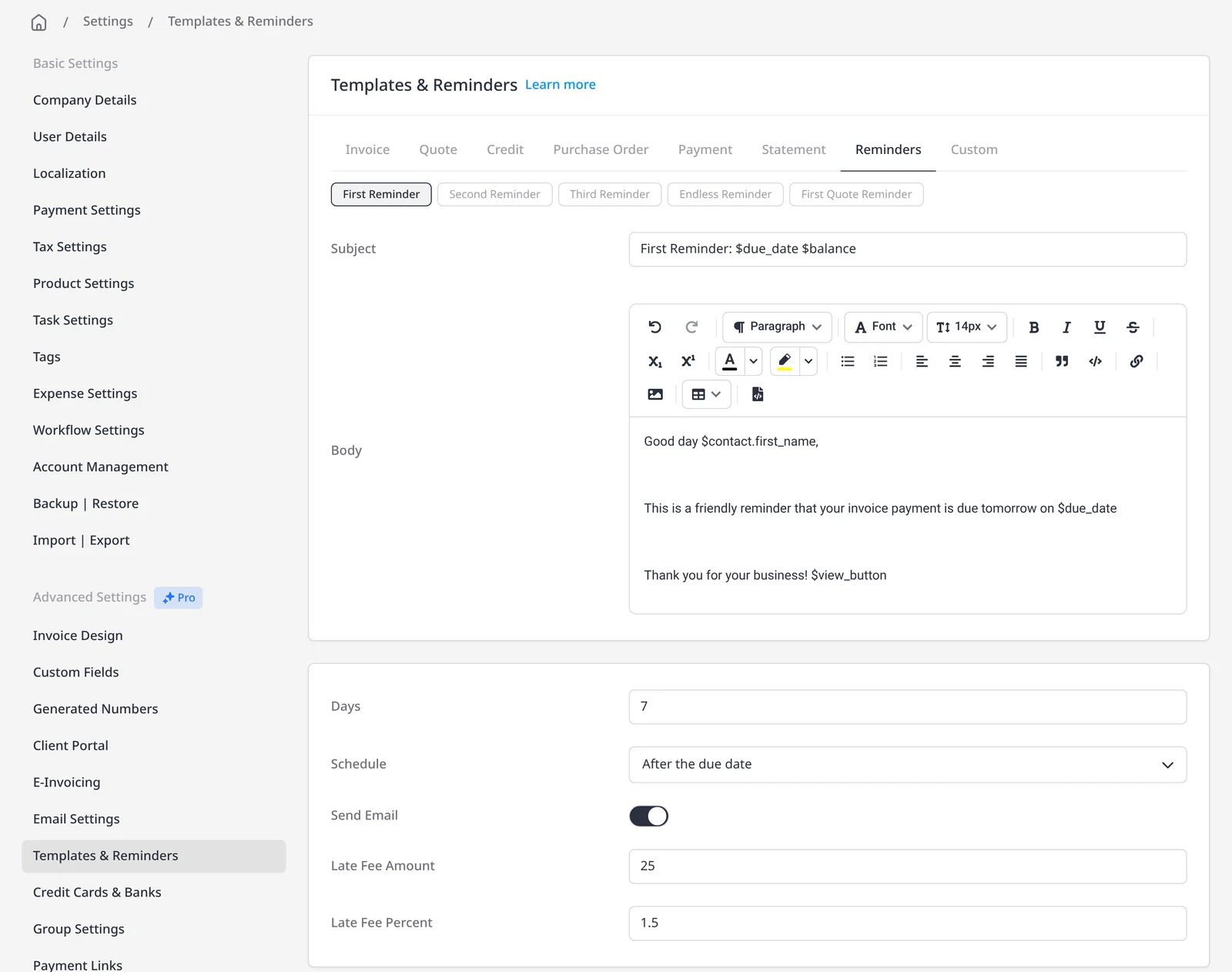


Stay on top of unpaid invoices without chasing them by hand
Automatic late-payment reminders email your client on a schedule you set, using a template you can edit. You can configure a first, second and third reminder, and then an endless reminder that keeps going at the frequency you choose. Automatic reminders are included on Pro ($14/mo) and Enterprise (from $18/mo). On every plan, including Free, you can also send a one-off reminder by hand and customize the message before you send it.
Set them up under Settings → Templates & Reminders. For each of the first three reminders, choose a number of days and a schedule: after the invoice date, before the due date, or after the due date. Turn on Send Email, and edit the subject and body like any other email template. Endless reminders start after the third reminder, on the frequency you set.
Each of the first three reminders can also add a late fee (a flat amount, a percentage of the remaining balance, or both) as a new line on the invoice. Late fees are optional and are configured on the same screen; this page is about the reminder emails first. Reminders only run for invoices when Send Reminders is enabled on that client, so you can leave it off for anyone with a special arrangement. An invoice is not treated as overdue, and overdue reminders and late fees will not run, until its due date has passed if you have set one.
What you can do
- Schedule first, second, third and endless reminder emails on Pro and Enterprise
- On every plan, including Free, send a one-off reminder by hand and customize the message before you send it
- Time each reminder after the invoice date, before the due date, or after the due date
- Edit the subject and body of each reminder template
- Optionally add a flat late fee, a percentage of the remaining balance, or both
- Turn Send Reminders on or off per client
Who it’s for
Freelancers and firms who want a consistent follow-up on unpaid invoices, without writing each reminder by hand, and who may also want a late fee when a reminder goes out.